Get a return on your EV charger: turn the power you give away into revenue
Free for up to 20 chargers · no EzGYM commission per session · no credit card
Step-by-step setup guides for 38 charger models: Wallbox, ABB, Huawei, Schneider, Zaptec, Easee and more. See guides by brand
If you have bought, or are about to buy, a charger for your parking lot, building, hotel, gym or shop, it does not have to be a cost. With EzGYM every session is billed for what was used and the receipt is issued automatically in your country: drop-in drivers pay by QR code with PayPal (or MercadoPago in Latin America), regulars charge with an RFID card and get an automatic monthly invoice, and the money goes straight to your account, with no middleman. What you earn is the difference between what you charge per kWh and what the energy costs you: work it out with your own numbers before setting the price.
Price per kWh and monthly profit calculator
Use the numbers from your electricity bill. Everything is calculated in your browser: nothing is saved or sent.
- Energy per month
- kWh
- What you charge per month
- What you spend per month
- Estimated monthly profit
- Margin per kWh
- %
- Minimum price per kWh to break even
Estimate before taxes, demand charges and charging losses. Use your real tariff.
Charge for every session by QR code or RFID card in EzGYMFrom cost to revenue
- Without billing, the energy every car takes comes out of your electricity bill.
- With EzGYM every session is measured in kWh and billed for what was used, at the price you set.
- The money goes straight to your PayPal or MercadoPago account, with no middleman: EzGYM never touches it.
- Each session’s receipt is issued automatically and filed with your country’s tax system if the account has e-invoicing.
How to bill by type of site
| Site | Who charges | How to bill them with EzGYM |
|---|---|---|
| Parking lot | Drop-in and monthly customers | QR code per connector for drop-ins; RFID and monthly invoice for monthly customers |
| Apartment building or condo | Residents and visitors | RFID and monthly invoice per resident; QR code for visitors |
| Hotel | Guests and visitors | QR code per connector, or RFID with the amount added to the guest’s bill |
| Gym or club | Members and visitors | Member’s RFID card, blocked if they owe money; QR code for visitors |
| Shop or restaurant | Passing customers | QR code per connector: they pay only for what they charge while they shop or eat |
| Fleet | Company drivers | RFID per driver and kWh per vehicle, without billing the driver |
Variable prices and idle fee
- A price per time slot and day of the week, for example cheaper at night.
- A price or a discount for a client group, a plan, customers with a card or employees.
- kWh included per month in a plan: anything above is charged at the rate.
- A per-minute fee for drivers who leave the car plugged in without charging, with grace minutes and a reminder to free the connector.
What you need to start
- OCPP 1.6J chargers that let you enter your own server URL (see the guides by model).
- Internet on the charger: Wi-Fi, cable or a 4G SIM.
- A PayPal or MercadoPago account connected to EzGYM to take QR payments.
- Your price per kWh: what the energy costs you plus your margin.
- Invoicing in EzGYM set up for your country: with e-invoicing, each session’s receipt is filed automatically.
What EzGYM does not do
- It does not sell or install chargers.
- It does not offer a card terminal on the charger. At public points of 50 kW or more in the European Union, AFIR requires a terminal: there the QR code is not enough.
- It does not tell you which permits you need to resell electricity: check the rules in your country.
How to start your charging business with EzGYM
- 1 Create your free account and add each charger with its price per kWh.
- 2 Enter the OCPP URL from the app in the charger and check that it shows as online.
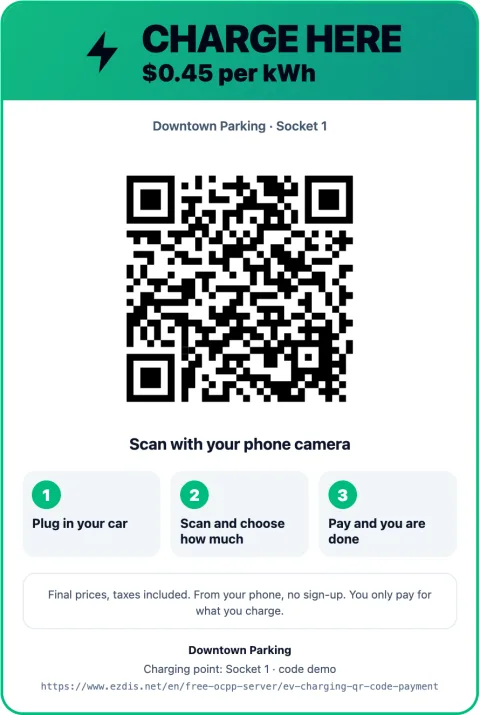
- 3 Connect your PayPal or MercadoPago account, turn on QR payment and print the sign with each connector’s QR code.
- 4 Give each regular customer an RFID card and, if you like, turn on the automatic monthly invoice.
- 5 Run a test session paying by QR code and compare the kWh charged with the charger’s meter.
If the charger does not start, rejects the command or delivers no kWh, everything is refunded through the same method. The receipt is filed with your country’s tax system if the account has e-invoicing.
Your chargers can also be queried and controlled from ChatGPT or Claude. See how
Frequently asked questions
How much can I make with a charger?
It depends on what the energy costs you, the price you charge and how many sessions you get. There is no number that fits everyone: use the price per kWh calculator with the figures from your electricity bill.
Does the customer have to download an app?
No. The driver scans the QR code with the phone camera and pays on a web page.
Where does the money go?
To your PayPal or MercadoPago account, the one you connected in EzGYM, with the fees of your contract with that provider.
Can the same charger serve customers and visitors?
Yes. On the same charger a visitor pays by QR code and a regular customer charges with their RFID card. The price per kWh is set on each charger.
How much does EzGYM cost?
The OCPP server is free for up to 20 chargers per account. Each QR payment carries the PayPal or MercadoPago fee.
More OCPP guides
- OCPP charger not connecting
- SteVe alternative without your own server
- Free alternative to Monta, myWallbox or ChargeLab
- Enel X JuiceBox after the shutdown
- Apartment buildings and condos
- Hotels
- Parking lots
- Gyms and clubs
- Electric fleets
- Charge for EV charging by QR code, with receipts
- How to invoice EV charging without building OCPP
- Latin America EV charging with dLocal Go & MercadoPago
- For EV charger vendors, importers & installers
- Your charger with AI (ChatGPT or Claude)
- OCPP 2.0.1 server
- OCPI: your chargers in apps
- Chargers in Mexico (A/108)
- OCPP error codes
- Price per kWh calculator
Guides by charger model
- Besen BS20
- Wallbox Pulsar Plus
- Wallbox Commander 2
- Wallbox Pulsar Max
- Wallbox Pulsar Pro
- Wallbox Copper SB
- Huawei FusionCharge AC
- ABB Terra AC Wallbox
- WEG WEMOB Wall
- WEG WEMOB Parking
- Intelbras EVE City (EVE 0074C / 0110C)
- Schneider Electric EVlink
- Circutor eNext
- Orbis Viaris Uni
- Orbis Viaris Combi+
- Fronius Wattpilot
- Enel X JuiceBox Pro
- Autel MaxiCharger AC
- Teltonika TeltoCharge
- Teison OCPP
- ZJBENY BCP OCPP
- Khons OCPP EV Charger
- go-e Charger Gemini
- go-e Charger PRO
- Easee Home / Charge
- Alpitronic Hypercharger DC
- Maxus EV Wallbox OCPP
- Zaptec Go
- Zaptec Go 2
- Zaptec Pro
- Alfen Eve Single / Double Pro-line
- KEBA KeContact P30 x-series
- Mennekes Amtron Professional
- Smappee EV Wall
- myenergi zappi
- V2C Trydan
- Delta AC MAX
- Policharger OCPP
- EVBox Elvi
- Growatt THOR
- GoodWe HCA
- GoodWe HCA G3
- Generic OEM OCPP Wallbox
Checked on 2026-11-26 against the server code. Official OCPP reference (Open Charge Alliance).
Start billing charging sessions